
Live Demo
Please remember you must use Internet Explorer to view the demos.If you try to open in Firefox or Chrome, you will get a blank blue screen after log in. For the 720p HD IP cameras, If you want to view them in HD, you must double click the video to view it in full screen, otherwise the demos are standard def.
Notice for Windows Vista and Windows 7 UsersClick Here


ZP-KC1H04-P
4 Channel 720P PoE NVR System
- H.264 Video Compression
- Night Vision up to 25m
- PoE Support
- 4 Channel 720P Network Video Recorder
- 4 720P Network IP Cameras
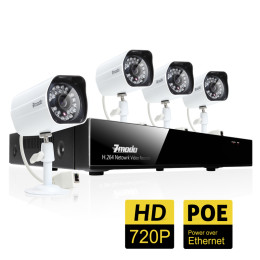
ZP-KE1H04-S
4 Channel 720P SPOE NVR System
- H.264 Video Compression
- Night Vision up to 25m
- PoE Support
- 4 Channel 720P Network Video Recorder
- 4 720P Network IP Cameras

ZH-IXC15-WC
720P HD Wireless Indoor Network IP Camera
- Up to 720P Recording Resolution
- 1/3" Progressive scan CMOS
- IR Range: 10m
- WiFi antenna Embedded, Supports SD-Card
- ONVIF Compliant


